
The short answer
Sell a mini-course online by defining a narrow final assignment, building a short lesson sequence and testing the access method you actually provide. A smartphone product-photography course can teach a repeatable setup, framing and review process with clear equipment assumptions.
Start with a final assignment
Decide what the learner will produce before recording lessons. Our example ends with a small set of product photographs using a smartphone, a simple background, and window light. State the equipment assumptions and starting level.
The goal is a repeatable process, not a guarantee of professional photography. A narrow assignment makes it easier to decide which explanations belong in the course and which can wait.
Outline a short learning sequence
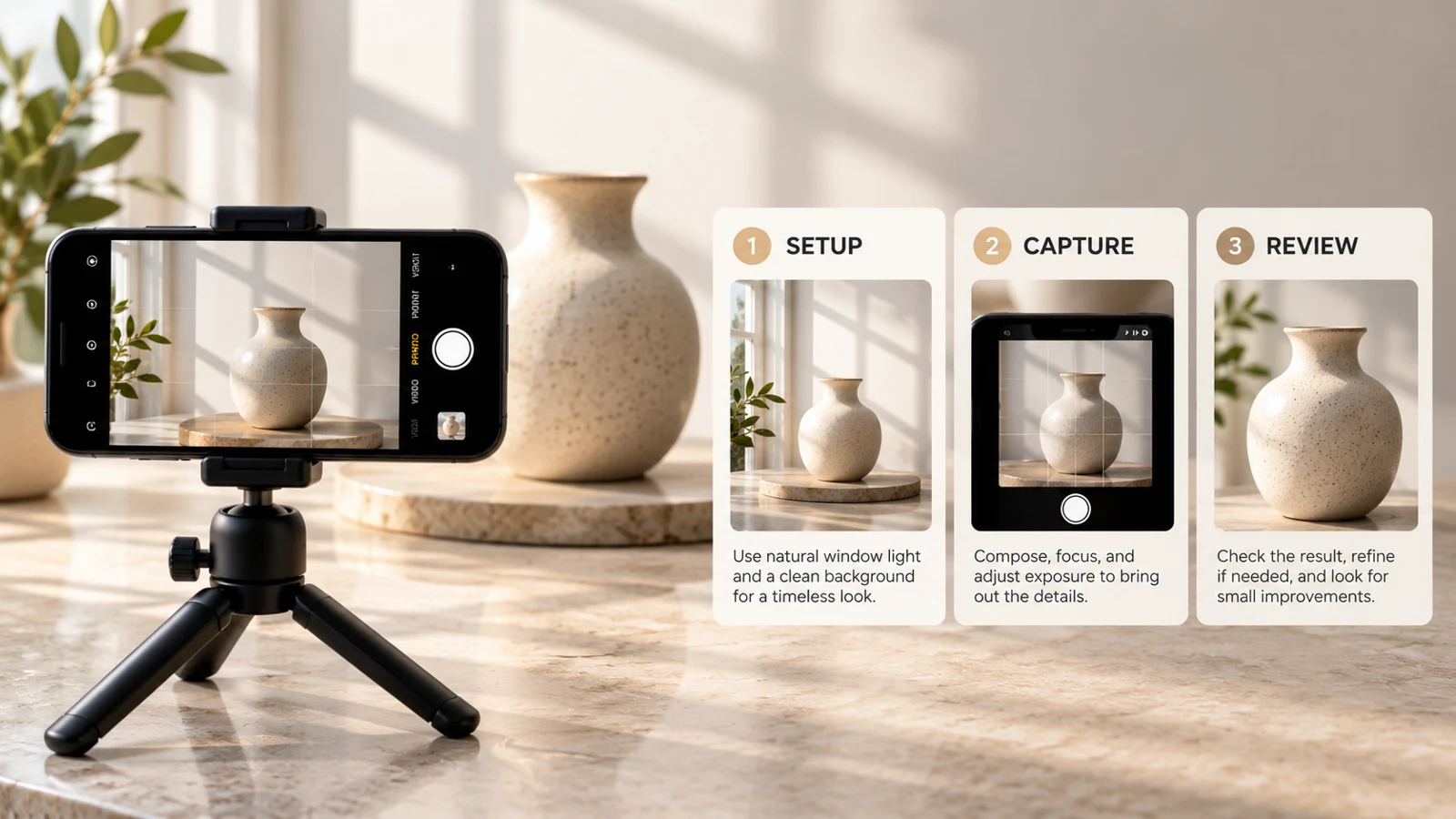
Build each lesson around a necessary decision. First prepare the background and light. Next demonstrate framing and focus.
Finally show how to compare shots and choose a consistent set. Include a small practice action after each lesson. Avoid padding the course with unrelated material to make the runtime look impressive.
The learner should understand how each step helps complete the final assignment.
Record a representative preview
A preview should let buyers judge your teaching. Show a short piece of a real lesson with clear audio and readable visuals. If you demonstrate a phone setting, name the device or explain that controls may differ.
Add accurate captions when possible. Do not hide all practical detail behind a montage. The sample should represent the pace and clarity of the paid lessons.
| Decision | What to check |
|---|---|
| Trailer only | Music and a promise |
| Useful preview | An actual teaching explanation |
Match the offer to actual delivery
Choose a delivery method your setup actually supports. If your account provides course hosting, test the learner access path. If you deliver video files as a digital package, describe it as that package and state the formats and playback requirements.
Do not imply progress tracking, quizzes, certificates, or automatic access unless you have checked those functions. The VIKOC listing should accurately describe the experience you will provide.
Review as a new learner
List the syllabus, total lesson length, included worksheets, access arrangement, and any support boundaries. Open the final lesson files and check audio, captions, and image quality. Test the intended access route before calling it verified.
Ask whether a new learner knows where to start and how to finish the assignment. Clear organization is part of the product, not something to add after sales begin.
Try it with one real offer
Outline three lessons ending in a consistent set of product photos: prepare light and background, frame and focus, then review and select. Give each lesson one practice action and record a representative preview.
Common questions
How long should a mini-course be?
Long enough to complete the stated assignment with useful practice. Remove unrelated material instead of adding runtime for its own sake.
Can I describe downloadable videos as a hosted course?
Describe the real experience. A file package needs formats and playback instructions; hosted access, progress tracking or certificates should only be claimed when available and tested.